
Extended Rates
Step 1: Creating an Extended Rate
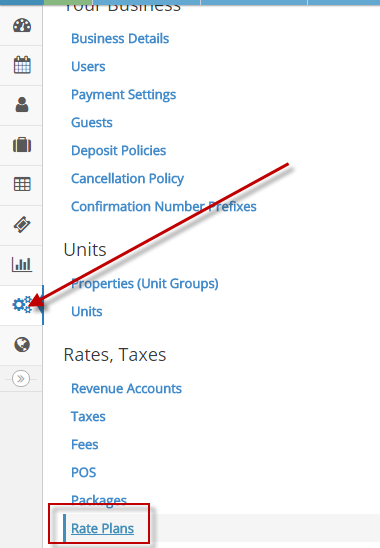
Create a new rate under Configuration > Rate Plans.
Step 2: Select the Rate Type
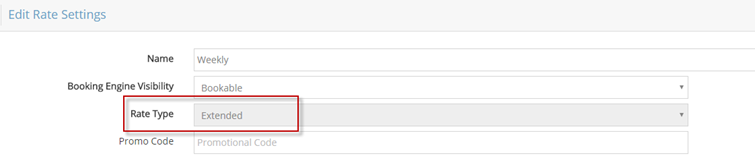
As you progress to add a new rate, make sure to set the “Rate Type” to “Extended”. The rate type cannot be changed after the rate’s created.
Step 3: Extended Rate Seasons
Although the extended rate seasons have a few more settings than the daily rates, they are simplified by the fact there is only one rate.
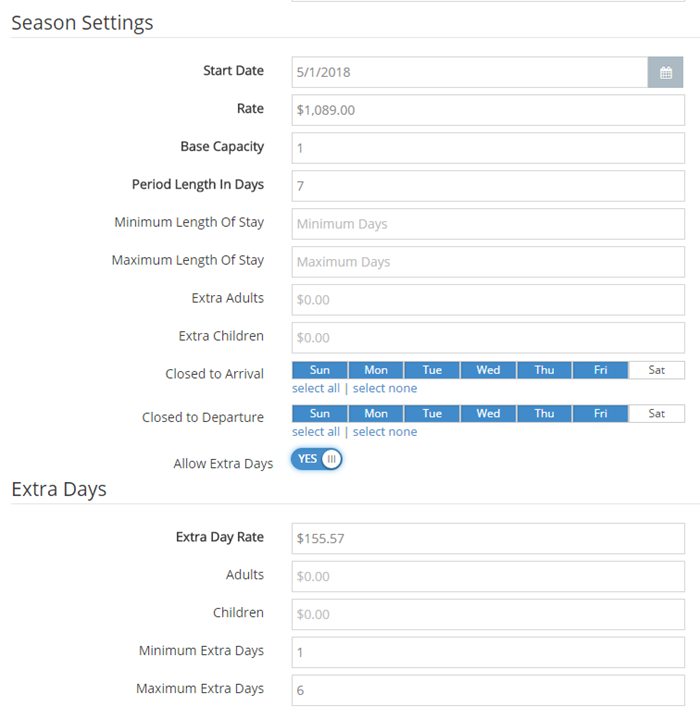
Settings for extended rates include:
- Name: The extended rate plan’s name.
- Promo Code: A code used to offer a special discount.
- Start Date: The date when the rate takes effect.
- Rate: The total dollar amount for the period length.
- Base Capacity: The number of occupants allowed before extra charges are added.
- Period Length in Days: The number of days associated to the season.
- Minimum Length of Stay: The minimum number of nights the season can be booked for.
- Maximum Length of stay: The maximum number of nights the season can be booked for.
- Extra {guest type}: How much to charge for each additional guest over the base capacity.
- Closed to Arrival: Days of the week that arrivals are not permitted by the season.
- Closed to Departure: Days of the week that departures are not permitted by the season.
- Allow Extra Days: Identifies if it is possible to book the season for periods (that are not divisible by the period length).
- Extra Day Rate: The amount to charge for days that are booked in addition to the period (e.g. day 8 if you have a weekly rate).
- {guest type} : How much to charge for each additional guest of that type over the Base Capacity for extra days.
- Minimum Extra Days: Minimum number of days beyond the last full period before you can book with the extra days charges.
- Maximum Extra Days: Maximum number of days beyond the last full period you can book with the extra days charges.
If extra days are not allowed, but the days are not closed to departure, you will be able to book the season. However, you will be charged the full period for any extra days.
Extended rates are not compatible with the OTAs regardless if it is directly connected to Booking.com or the Channel Manager.
To learn more about extended rates click here.