
Occupancy Map Customizations and the “Everything” Report
We are happy to announce two updates to the rezStream Cloud today. The first includes a new way to customize the look and feel of your Occupancy Map. The second is a new reservations report that includes a lot more detail about your daily arrivals!
Your Occupancy Map, Your Way
The Occupancy Map is a wealth of information in a single view. Today we are announcing a new way to control what information is displayed on each reservation so that the information you care most about is front and center.
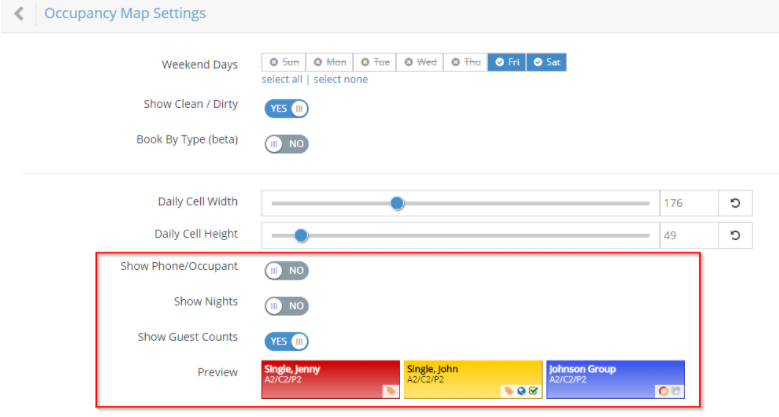
We have always displayed the Reservation Name, the Guest Name, the Guest Phone Number, and the Number of Nights within a reservation block on the Occupancy Map. We have now added the ability to display the Number of Guests assigned to that unit and control over which items to display. If you love to see as much information as possible, you may want all of them displayed (and this is what you will see by default) or if you prefer a more minimalist approach, you might want only some of this information displayed.
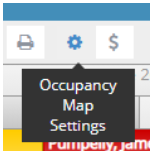
To configure what you see, simply open the Occupancy Map Settings by clicking the Gear button on the Occupancy Map toolbar:
From there, choose Display Settings and use the toggles to control what is shown on your Occupancy Map. Note, we updated our Preview area to show the various ways the information will be displayed on different types of reservations:
If there is additional information you’d like to see on your Occupancy Map reservations, please let us know in our Idea Forum!
Please refer to our knowledge base article for more details on how to customize your Occupancy Map!
The New “Everything” Report
This week, we introduced a Reservations report called People Arriving by Day. This report provides a list of people arriving by day. It can be run for a single day or for a range of dates grouping those arrivals by day. This report contains a lot of data and is therefore primarily intended to be used for exporting to Excel where you can pick and choose which bits are important to you. It includes just about everything we know about (1) the guest including their name, address, and contact information, (2) the unit assignment including number of guests, (3) the reservation including the channel where it was booked, and (4) the invoice broken down by type along with payment and balance due.
As always, we hope you enjoy this latest update, and thanks for using rezStream!